設定
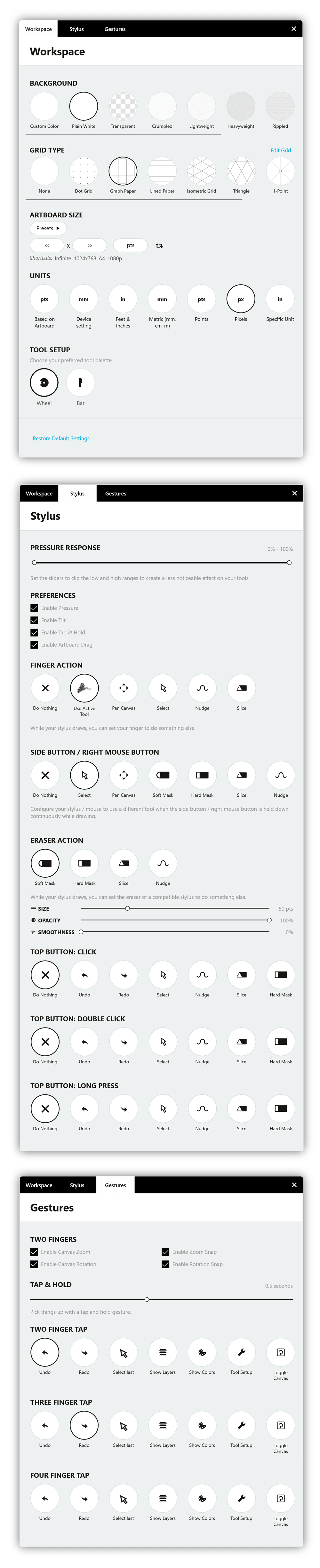
In the Settings menu, you’ll see two different tabs, allowing you to configure your Workspace and your Interactions.
Workspace
In the Workspace tab, you can configure your canvas experience.
Background
The first option in this menu is the Background. Concepts offers you nine different backgrounds, including basic paper types with subtle textures, transparent, blueprint and darkprint. We also give you the option to create a custom color background.
Grid Type
The second feature on the menu is your Grid type. There are five basic grid types to choose from: Dot grid, Graph Paper, Lined Paper, Isometric and Triangle as well as perspective grids. To learn more, see Grid.
Artboard Size
Next up is the Artboard Size. If you want to create a certain sized drawing, this is the place to set your boundaries. You can use one of the presets Concepts offers or create a custom-sized artboard - just tap+hold on the size to enter the values. We offer shortcuts for most-used sizes, but you can find more presets if you tap the “Presets”. You can find common paper sizes, screen sizes and even business card sizes.
Pro Tip: On canvas, tap+hold a corner of the artboard to move it about - handy for framing your drawing just so, cropping images into an exact size, and getting a reference for how big / small your drawing is based on real-world scale. When you Export, you can choose to capture the image according to the artboard’s sizing.
Drawing Scale
Fourth on the menu, you can set your Drawing Scale. Select from the shortcuts, or tap+hold on the value fields to choose from other presets or to enter custom values. Tap+hold on the units to change them, as well.
Units
Select the overall Units you prefer to apply them to your workspace. You can select your preferred unit of measurement based on these measurement systems metric, imperial and digital units where you can set your measurements to auto-scale or to a specific unit. Additionally, In the Display Format & Precision section you have the possibility to format display and precision level of your measurements.
Lastly, enable the first box to show stroke length on the right side in your drawing (this is very useful for left-handed users) and show scale instead of measurements on status bar by enabling the last tick box.
Tool Setup
You can choose between the Tool Wheel or the Tool Bar. This determines how your tools are laid out on the canvas.
Interaction
Under the Interaction tab, configure settings specific to how you operate Concepts with gestures and styli.
Keyboard & Mouse
In the Keyboard & Mouse section you can disable or enable keyboard shortcuts. Tap “Edit Shortcuts” to see the full list of supported keyboard shortcuts and customize them to your liking.
Keyboard Shortcuts
There's plenty of helpful shortcuts in Concepts. You’ll find the Keyboard shortcuts in the "Interactions" section of "Settings".
For users without touch-enabled devices there’s keyboard shortcuts to access Pan, Zoom and Rotation modes easily. Read more about Pan, Rotate and Zoom modes here.
Tap "Edit Keyboard Shortcuts" to see the full list of shortcuts and tap the typing field to edit a shortcut. You can use modifier keys Ctrl, Alt and Shift along the alphanumeric characters to create your own shortcuts. If you want to restore a shortcut to its default, activate the shortcut field and tap on the arrow next to the typing field. If you want to restore all the keyboard shortcuts to their defaults, scroll down and click Reset Shortcuts.
Touch Input
Under the Touch Input heading, you can choose how you want to interact with the app controls. First, find information on one- and two-finger actions.
The default setting for Two Fingers is canvas rotation and zoom. If you want your canvas to maintain its angle and zoom at all times, you can disable canvas rotation and zoom by unchecking the boxes. If you still need to rotate it every now and then, but don’t want to go back and forth from the menu, you can tap+hold on the degree or zoom value in the upper right corner of the status bar to enter the rotation via keyboard.
Tap+hold action and delay can be set according to your preferences. If you’d like tap+hold to react faster, just drag the handle left to make the delay shorter, or if it feels too fast, just drag the handle to the right.
Two-finger tap, three-finger tap and four-finger tap are wonderfully useful for a faster workflow. There are ten options to choose from for each gesture: undo, redo, select last item, show layers, show color wheel, tool setup, toggle canvas rotation, toggle canvas zoom, select all and do nothing. Play with these options to find the ones that are most useful for you.
Stylus
If you’re using a supported stylus, you can adjust and enable the pressure response and enable the tilt. Also choose from finger actions that function independently from the stylus: Do Nothing, Use Active Tool, Pan Canvas, Select, Nudge, Slice, Zoom and Rotate. If you choose Select, for example, you can use your finger to quickly select in your drawing, and continue drawing with your stylus.
The shortcut button on supported styli, or the right mouse button can be configured as well. Buttons can be configured to: Do Nothing, Select, Pan Canvas, Soft Mask, Hard Mask, Slice, Nudge, Zoom and Rotate.
If you use a stylus with a dedicated eraser end, you can also set the eraser action. The chosen settings will also be applied for the keyboard shortcut eraser “E”.